
An AI quota HUD on the KDE panel
I currently use Claude Code, Codex, Gemini (through agy on the command line), and DeepSeek on Arch Linux with KDE Plasma 6. For me, as for many others, the problem has become knowing which one still has quota—especially when a task already carries a lot of context, reviewed files, and an hour of iteration.
That is how I ended up building a viewer, or HUD, for the KDE panel: four indicators showing how much room each agent has left and when its quota should reset. No extra tab, no separate dashboard, and—most importantly—no surprise when the quota runs out while I am wrapping up a task or a git rebase 😱.
First spoonful: the token-week
Each provider invented its own way of measuring how much we can use it.
Claude speaks in windows of hours and days. Codex reports the windows available for the plan. Gemini requires a local estimate of requests. DeepSeek, by contrast, speaks in monetary balance.
Four agents, four clocks, and no shared unit.
The industry has achieved something rather peculiar: turning token-hours and token-weeks into real planning units. It is no longer enough to ask how long a task will take. I also have to calculate whether the agent can finish it before leaving me to do things the old-fashioned way :).
On the panel I reduced it to four rings, or donuts. A nearly full one means the agent still has room. A nearly empty one means it is probably time to thank it for its service and try the next one.

Hovering over it shows the details of each window and its reset time:
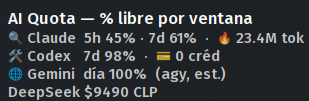
Opening the widget shows the complete detail for all four agents:
Second spoonful: the data decides, not the order
The first version worked well for weeks. Codex returned two windows: a short five-hour one and a weekly one.
My code interpreted them by position:
- The first window, or outer ring, was the five-hour one.
- The second was the weekly one.
It was simple—until Codex changed the schema.
One day the widget showed 5% available in the supposed “5h” window, but with a reset scheduled six days later. Even for a technology company, five hours lasting almost a week seemed like too much innovation.
The raw response contained a single window:
604800 seconds
That is seven days.
Codex had stopped reporting the short window, but my code still called whatever appeared first “5h.” At the same time, the old weekly window remained frozen in the cache because the “keep the last good value” logic could not distinguish between a failed query and a window that had ceased to exist. 👻
The correction had two parts.
First, each window stopped being identified by its position and began to be identified by its actual duration. A short duration is a session; an extended duration is a weekly window or equivalent.
Second, the monitor now distinguishes between:
- a query that failed, in which case it temporarily preserves the previous value and marks it as cached;
- a valid query that no longer contains a window, in which case it removes that window from the current state.
The interface also stopped assuming that every agent has the same structure. If two windows arrive, it draws a double donut. If one arrives, it draws a single ring. The data defines the interface, not the other way around.
The lesson is small but fairly general: if the provider supplies the duration, that is the identity of the data; its position in an array is only a temporary coincidence.
Third spoonful: local, useful, and not very universal
This project is not meant to be a cross-platform application.
I built it for an environment very much like mine:
- Arch Linux;
- KDE Plasma 6;
systemd --user;- Python;
- Bash;
- QML;
- the local sessions and credentials of the tools I already use.
It can probably be adapted to other distributions running Plasma 6. I do not promise that it will work unchanged on GNOME, Plasma 5, Windows, or macOS. Nor did I abstract every possible authentication method. It is a tool for my own desktop that I decided to organize and publish, not an attempt to solve every possible combination of operating systems, providers, and plans.
Inside, the path is short:
                 systemd --user timer
                          │
                     every five minutes
                          ▼
 helpers/*.sh ──► Python monitor ──► status.json
                                           │
                            ┌──────────────┴──────────────┐
                            ▼                             ▼
                    QML widget                      MCP server
              panel · tooltip · popup       checks before delegation
The helpers are the only component that touches credentials. They return sanitized JSON, without authentication tokens or conversation content.
The Python monitor queries, validates, and merges the information. If it encounters a timeout, an expired credential, or a 429 error, it preserves the last known value and marks it as cached.
The systemd timer runs the update every five minutes. The widget does not query providers directly; it only reads a local file with 0600 permissions. That way I avoid triggering a rate limit by checking the rate limit too often, which would be an especially elegant way of closing the loop. 🫠
The same status.json can be read by an MCP server. This lets an agent ask which provider still has quota before delegating a task. The desktop bar and the orchestrator receive exactly the same state.
Closing
The repository is published under the MIT license. It is designed for KDE Plasma 6, does not require sudo, and installs into the user’s local paths:
git clone https://github.com/tatanlabra/ai-quota-kde.git
cd ai-quota-kde
scripts/install-user.sh
ai-quota-monitor doctor
It does not create more quota, negotiate better plans, or eliminate the token-week. It only prevents me from discovering halfway through a task that the chosen agent has gone off in search of additional quota 🤑.
It is a small spoonful of sovereignty over my own workflow: knowing how much remains, when it resets, and who should get the next handoff.




Deja un comentario